Field note
Writing Verification Progress Messages
A verification status message has to do four things in two or three sentences: say where the check is, say what happens next, give a realistic time and say how the player will hear. Here is sample wording for each stage, and how to make sure screen readers announce it.
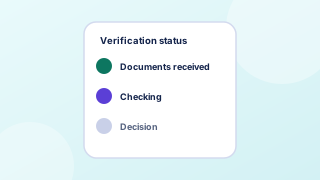
Sample wording by stage
| Stage | Sample message |
|---|---|
| Received | We have your documents. Checks usually take less than a day. We will email you when they are done. |
| Checking | We are checking your documents now. You can't play until checks are complete. You don't need to do anything. |
| More needed | We need one more document: a bank statement from the last three months showing your name and address. Upload it here. This is the only extra document we need. |
| Approved | Your account is verified. You can now deposit and play. Set a deposit limit any time in Safer play. |
| Declined | We could not verify your account with these documents because the name does not match. Here is what you can do next, and how to contact us. |
Rules for the wording
- Lead with the state. The first words should be the status, not a greeting.
- Name the document exactly. "A bank statement from the last three months" is actionable; "proof of address" is not.
- Say "only" when it is true. Players fear an endless chain of requests. If this is the last document, say so.
- Explain a decline. Give the reason you can share and the next step. A bare "rejected" leads straight to a support contact.
- Keep the tone neutral. The GOV.UK error guidance warns against blaming words such as "you forgot"; the same applies to status messages.
Making updates heard
When the status changes on screen without a page reload, WCAG 2.2 criterion 4.1.3 applies: in markup-based content, "status messages can be programmatically determined through role or properties". In practice, place the status text in an element with a polite live region or the status role, and update its text rather than replacing the whole element. Do not move focus to a status update unless the player must act on it, such as an extra document request. See status message in the glossary.
The W3C forms tutorial's principle applies here too: "Provide feedback to users about the results of their form submission, whether successful or not." After an upload, say clearly whether it worked before saying anything else.
Visual pattern
Pair each status with a word, a step indicator and an icon that differs in shape, so the stage is clear without color. The status colors field note covers the contrast side. Show the date and time of the last change so players can tell whether anything has moved since they last looked.
Worked example (invented)
Before: "Pending." After: "Step 2 of 3: checking your documents. We received them on October 27 at 2:14 pm and checks usually take less than a day. We will email you when they are done; you do not need to keep this page open."
Questions
Should the status page refresh itself?
It can check for updates, but announce changes politely rather than reloading the page, which loses the player's place and can interrupt a screen reader.
How specific should the time estimate be?
Give the usual time and what can extend it. If most checks finish within a day but some need manual review, say both.
Sources
- W3C WAI, Understanding Success Criterion 4.1.3: Status Messages, updated May 11, 2026.
- W3C WAI, User Notification (Forms Tutorial), updated June 3, 2022.
- GOV.UK Design System, Error message, no date shown.
- Gambling Commission, New age and identity verification rules - changes to the LCCP from Tuesday 7 May, published May 3, 2019, updated August 27, 2021.
Every source was read on October 27, 2026. How we choose and date sources: data sources.